


Original image by ignacio sottano on Pexels
How to Add Leaderboards to Your Game in 15 Minutes
How to Add Leaderboards to Your Game in 15 Minutes
Mar 2, 2026
You've got a great gameplay loop in your game and now you need leaderboards. Your players to want replay, compete, share their scores and their glory. You could spend a week researching backend infrastructure and free leaderboard APIs, or you could have something working by the time you finish your coffee.
By the end of this guide you'll have created a free LEADR account, set up a game and leaderboard, submitted your first score, and have a live, shareable leaderboard page you can show people right now. The whole process takes about fifteen minutes, and most of that is reading this article.
Why not just use Steam?
If you're shipping on Steam, you might assume Steam leaderboards are the obvious choice. They're free, they're built in, and Steamworks handles the infrastructure.
For a Steam-only release where you don't care about leaderboard features, that can work. But it comes with tradeoffs that aren't always obvious at the start.
Steam leaderboards only exist within Steam. If you later want to release on mobile, or ship on multiple PC storefronts, or run a web version, you're maintaining separate leaderboard systems per platform. Your player base gets fragmented. Your code gets messy. And Steam's leaderboard features are minimal: sorted lists with basic filtering, limited anti-cheat tools, and no public-facing leaderboard pages you can embed or share.
Platform-native leaderboards are bundled free because they're not the product. There's little competitive pressure to make them better, so they tend to stay basic.
If any of that matters to you, it's worth spending fifteen minutes to set up a game leaderboard service that's more flexible. If you want the full breakdown of what's available, there's a detailed comparison of leaderboard options that covers the landscape. For now, let's get you up and running.
What you'll need
A game with any value players want to track or be ranked by. Or a hypothetical one. Think points, XP, play time, speedrun time, enemies killed, waves completed, bananas collected, anything.
An internet connection.
Fifteen minutes.
That's it. No server setup. No credit card. LEADR's open-source leaderboards works with Unity, Godot, and any engine that can make HTTP requests.
The steps
1. Create your LEADR account
Download the LEADR app on Windows, Mac or Linux, and register to create an account.
2. Create a game
In LEADR, a "game" is a container for your leaderboards. One game can have multiple boards: maybe a high score board, a speedrun board, and a daily challenge board. They all live under the same game.
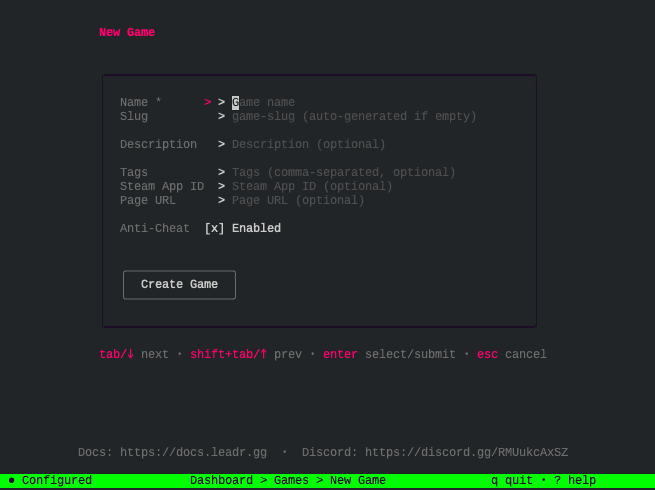
Choose "Games" from the LEADR app main menu, press n to create a new one, give it a name, and hit "Create Game". You can change the name and settings later if you need to. Done.
3. Create a leaderboard
Inside your game, create your first board. You'll need to give it a name, choose a board type, and make sure "Published" is checked.
For most cases, the default settings work fine. Higher scores rank better, entries are persistent, and scores are publicly visible. If you want to track fastest times (lower is better), weekly resets, or invite-only boards, those options exist but you don't need them to get started.
The advanced board features are there when you need them. For now, accept the defaults and move on.
4. Set up your SDK
LEADR provides SDKs for Unity and Godot that simplify authentication, score submission, and leaderboard queries. For other engines, the REST API does the same thing with standard HTTP requests.
Follow the Get the SDK guide to download and install the SDK for your engine. Then check the SDK setup guide for configuration. You'll need your game ID, visible in app.
Leave test_mode unchecked if you want the score to show up on the live web page.
This usually takes two or three minutes depending on your engine.
5. Submit your first score
With the SDK configured, submitting a score is a single function call.
In Godot:
await Leadr.submit_score(board.id, score_value, player_name)
await Leadr.submit_score(board.id, score_value, player_name)
In Unity:
await LeadrClient.Instance.SubmitScoreAsync(boardId, scoreValue, playerName
await LeadrClient.Instance.SubmitScoreAsync(boardId, scoreValue, playerName
Replace board_id with your leaderboard's ID (visible in the dashboard), and player_name with whatever display name you use for the player. The score is whatever value you're tracking.
For the full details, including optional metadata, error handling, and callbacks, see the engine-specific documentation:
Run your game, trigger a score submission, and check your dashboard. You should see the entry appear.
6. See it live
Every LEADR leaderboard has a public URL. You can find it in your dashboard under the board's settings.
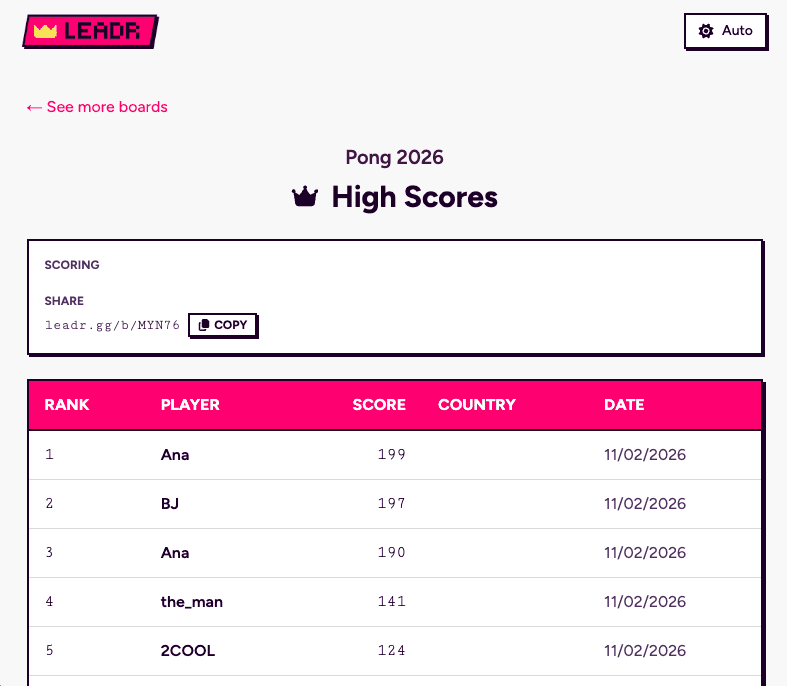
Open that URL in a browser. Your score is there. The page updates in real time as new scores come in. You can share this link with players, embed it on your game's website, or just watch it populate as people play.
That's it. You have a working leaderboard.
What you get
Here's what you now have:
Scores submitting from your game. The SDK handles the authentication, network requests, and error states. You call one function.
A live, shareable leaderboard page. No web development required. The page exists, it's public, and it updates automatically.
An app to manage entries. View scores, see submission metadata, remove flagged or invalid entries. Moderation tools are built in.
Anti-cheat running automatically. LEADR's free leaderboard API validates scores server-side and flags suspicious submissions. You don't have to configure anything for basic protection.
Room to grow. When you're ready, you can add seasonal resets, archived leaderboard history, ratio boards for win percentages or K/D ratios, invite-only boards for streamers or private tournaments, replay data storage, and more. The infrastructure scales with you.
The setup isn't a demo you'll replace later. It's the same system that handles production games.
Where to go from here
The full documentation covers everything, but here are the likely next steps:
The Unity and Godot SDK docs cover pagination, "around me" queries, and other advanced features.
See the board configuration reference docs to set up incrementing counter boards, derived percentages or ratios, one-off tournaments, invite-only boards.
Board templates let you set up seasonal resets, weekly challenges, or repeating events.
The self-hosting guide covers deployment if you want full control over your infrastructure.
Alternatives
If you need a full game backend with authentication, matchmaking, cloud saves, and economy systems, LEADR isn't trying to be that. Nakama and Talo are both popular open-source game backends and worth considering.
If you're shipping on a single platform and the limitations don't bother you, platform-native leaderboards like Steam's exist and cost nothing extra.
For everyone else, a focused tool that does one thing well like LEADR tends to get you further faster than a comprehensive backend you'll only use 10% of. There's a full comparison of leaderboard options if you want to evaluate the landscape properly.
You're done
You now have a working leaderboard with a live public page, submitted from your game, in about fifteen minutes. That's leaderboards integrated. Now back to building your game.
You've got a great gameplay loop in your game and now you need leaderboards. Your players to want replay, compete, share their scores and their glory. You could spend a week researching backend infrastructure and free leaderboard APIs, or you could have something working by the time you finish your coffee.
By the end of this guide you'll have created a free LEADR account, set up a game and leaderboard, submitted your first score, and have a live, shareable leaderboard page you can show people right now. The whole process takes about fifteen minutes, and most of that is reading this article.
Why not just use Steam?
If you're shipping on Steam, you might assume Steam leaderboards are the obvious choice. They're free, they're built in, and Steamworks handles the infrastructure.
For a Steam-only release where you don't care about leaderboard features, that can work. But it comes with tradeoffs that aren't always obvious at the start.
Steam leaderboards only exist within Steam. If you later want to release on mobile, or ship on multiple PC storefronts, or run a web version, you're maintaining separate leaderboard systems per platform. Your player base gets fragmented. Your code gets messy. And Steam's leaderboard features are minimal: sorted lists with basic filtering, limited anti-cheat tools, and no public-facing leaderboard pages you can embed or share.
Platform-native leaderboards are bundled free because they're not the product. There's little competitive pressure to make them better, so they tend to stay basic.
If any of that matters to you, it's worth spending fifteen minutes to set up a game leaderboard service that's more flexible. If you want the full breakdown of what's available, there's a detailed comparison of leaderboard options that covers the landscape. For now, let's get you up and running.
What you'll need
A game with any value players want to track or be ranked by. Or a hypothetical one. Think points, XP, play time, speedrun time, enemies killed, waves completed, bananas collected, anything.
An internet connection.
Fifteen minutes.
That's it. No server setup. No credit card. LEADR's open-source leaderboards works with Unity, Godot, and any engine that can make HTTP requests.
The steps
1. Create your LEADR account
Download the LEADR app on Windows, Mac or Linux, and register to create an account.
2. Create a game
In LEADR, a "game" is a container for your leaderboards. One game can have multiple boards: maybe a high score board, a speedrun board, and a daily challenge board. They all live under the same game.
Choose "Games" from the LEADR app main menu, press n to create a new one, give it a name, and hit "Create Game". You can change the name and settings later if you need to. Done.
3. Create a leaderboard
Inside your game, create your first board. You'll need to give it a name, choose a board type, and make sure "Published" is checked.
For most cases, the default settings work fine. Higher scores rank better, entries are persistent, and scores are publicly visible. If you want to track fastest times (lower is better), weekly resets, or invite-only boards, those options exist but you don't need them to get started.
The advanced board features are there when you need them. For now, accept the defaults and move on.
4. Set up your SDK
LEADR provides SDKs for Unity and Godot that simplify authentication, score submission, and leaderboard queries. For other engines, the REST API does the same thing with standard HTTP requests.
Follow the Get the SDK guide to download and install the SDK for your engine. Then check the SDK setup guide for configuration. You'll need your game ID, visible in app.
Leave test_mode unchecked if you want the score to show up on the live web page.
This usually takes two or three minutes depending on your engine.
5. Submit your first score
With the SDK configured, submitting a score is a single function call.
In Godot:
await Leadr.submit_score(board.id, score_value, player_name)
In Unity:
await LeadrClient.Instance.SubmitScoreAsync(boardId, scoreValue, playerName
Replace board_id with your leaderboard's ID (visible in the dashboard), and player_name with whatever display name you use for the player. The score is whatever value you're tracking.
For the full details, including optional metadata, error handling, and callbacks, see the engine-specific documentation:
Run your game, trigger a score submission, and check your dashboard. You should see the entry appear.
6. See it live
Every LEADR leaderboard has a public URL. You can find it in your dashboard under the board's settings.
Open that URL in a browser. Your score is there. The page updates in real time as new scores come in. You can share this link with players, embed it on your game's website, or just watch it populate as people play.
That's it. You have a working leaderboard.
What you get
Here's what you now have:
Scores submitting from your game. The SDK handles the authentication, network requests, and error states. You call one function.
A live, shareable leaderboard page. No web development required. The page exists, it's public, and it updates automatically.
An app to manage entries. View scores, see submission metadata, remove flagged or invalid entries. Moderation tools are built in.
Anti-cheat running automatically. LEADR's free leaderboard API validates scores server-side and flags suspicious submissions. You don't have to configure anything for basic protection.
Room to grow. When you're ready, you can add seasonal resets, archived leaderboard history, ratio boards for win percentages or K/D ratios, invite-only boards for streamers or private tournaments, replay data storage, and more. The infrastructure scales with you.
The setup isn't a demo you'll replace later. It's the same system that handles production games.
Where to go from here
The full documentation covers everything, but here are the likely next steps:
The Unity and Godot SDK docs cover pagination, "around me" queries, and other advanced features.
See the board configuration reference docs to set up incrementing counter boards, derived percentages or ratios, one-off tournaments, invite-only boards.
Board templates let you set up seasonal resets, weekly challenges, or repeating events.
The self-hosting guide covers deployment if you want full control over your infrastructure.
Alternatives
If you need a full game backend with authentication, matchmaking, cloud saves, and economy systems, LEADR isn't trying to be that. Nakama and Talo are both popular open-source game backends and worth considering.
If you're shipping on a single platform and the limitations don't bother you, platform-native leaderboards like Steam's exist and cost nothing extra.
For everyone else, a focused tool that does one thing well like LEADR tends to get you further faster than a comprehensive backend you'll only use 10% of. There's a full comparison of leaderboard options if you want to evaluate the landscape properly.
You're done
You now have a working leaderboard with a live public page, submitted from your game, in about fifteen minutes. That's leaderboards integrated. Now back to building your game.
Ready to add leaderboards to your game?
Ready to add leaderboards to your game?